React hooks
August 20, 2021

| Content |
|---|
| Hooks rules |
| Hooks state |
| Effect Hook, onClick event |
| Context,Ref,Reducer hooks |
| Custom hook example |
In a distant past, maybe a year ago or so, if you had a functional component and, all of a
sudden realised, that you needed to use state in your application or lifecycle methods,
you had to use a class. That's no longer the case with hooks.
React now comes with some built-in hooks, which provide functionality previously only
available with class components such as UseState.
Hooks rules
It doesn't have to be an object
In a class the state is always an object. This is not the case with Hooks. The state
can be a string, number, boolean or an object with each piece of state holding
a single value.
{
    count: 0,
    name: '',
    loading: false
}
Only call Hooks at the top level
Hooks can't be call inside loops, conditionals, or nested functions (any function with a functional component). This is to make sure, they're always call in the same order.
Only call Hooks from React functions
They can't be use with regular JavaScript functions. Only React function components.
Hooks state
UseState is a React built-in hook use for setting/ retrieving state
import React, { useState } from 'react'
  const App = (props) => {
    const [count] = useState(props.count);

    return (
      <div>
        <p>Count is ${count}</p>
      </div>
    )
  }
}
The useState returns a pair where the first element is the current state
value/initial value, and the second one is the function that's used for updating it.
import React, { useState } from 'react'
const [count,setCount] = useState(0);

 <p>You clicked {count} times</p>
 <button
    onClick={() => setCount(count + 1 )}
 >
    Click me
 </button>
onClick events
Using an onClick event to update the state.
const App = (props) => {
  const [ count, setCount ] = useState(props.count);
  const handlePlus = () => setCount(count + 1);

  return (
    <div>
      <p>Count is ${count}</p>
      <button onClick={handlePlus}>Plus One</button>

    <button onClick={() => setCount(count - 1))}> Minus One</button></div>
  )
}
Another useState example
import React, { useState } from 'react'
import ReactDOM from 'react-dom'

const NoteApp = () =>  {
  const [notes, setNote] = useState([]);
  const [title,setTitle] = useState('');

  const addNote = (e) =>  e.preventDefault();
    setNote([...notes,{ title }])
    //clear form
    setTitle('');

} //addNote

  const removeNote = (noteObj) => {
    let title = noteObj.title;
      setNotes(notes.filter(itm => itm.title !== title ))
  }

  return (
    <div>
      <h1>Notes</h1>
      {
        notes.map(itm => <div ket={itmm.title}>
            <h3>{itm.title}</h3>
            <button onClick={(itm) => removeNote(itm)}>Delete</button>
          </div>
       )
      }

      <p>Add note</p>
      <form onSubmit={addNote}>
        <input type="text" onChange={() => setTitle(e.target.value)}/>
        <button>Submit</button>
      </form>
    </div>
  )

}
Effect hook
This is another built-in hook from React, that allow us to perform side effects - an
action. React describes useEffect as componentDidMount, componentDidUpdate, and
componentWillUnmount combined.
Side effects that are needed for:
• updating the DOM
• fetching/consuming data from an API
• setting up subscriptions, etc
How-to work with effect
It can run once when the component first mounts, and/or every time thereafter the state changes. Also, it can be used to track multiple pieces of state together.
//hook
useEffect()

//pass a function to hook
useEffect( + () => {})

//placed inside function body
use(effect() => {
  console.log(
    'running effect'
  );
})
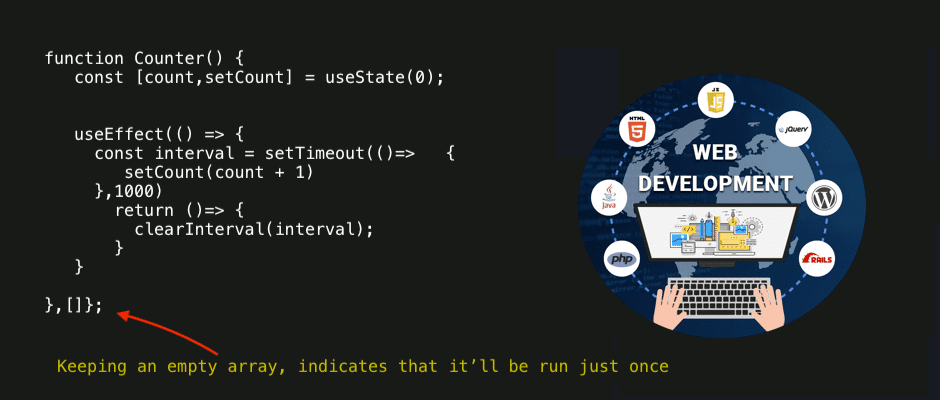
Effect hook & empty array
Passing an empty array as second argument to the effect hook mimics componentDidMount
lifecycle method behaviour.
Other Hooks
This hook is for working with React's Context API; which itself is a mechanism for sharing data within components without passing props.
Ref Hook
A common use for useRef is to grab a handle on a DOM element in React.
Reducer Hook
It works similar to useState, but it manages state using a Redux pattern. It doesn't update the state directly, instead we dispatch actions to a reducer function.
Custom Hook
To fetch data from JSONPlaceholder into a Home component and rendering it.
Moving fetch logic below into a new custom hook.
   const Home = () => {
    const [data,setData] = useState(null);
    useEffect(() => {
     fetch("https://jsonplaceholder.typicode.com/todos")
      .then(res => res.json())
      .then(data => setData(data))
    },[]);

    return (
     <>
        {data && data.map(itm => <pkey={itm.id}>{itm.title}</p>

        }
     </>
    )
   }
useFetch Hook (custom hook)
   import { useState, useEffect } from "react";

   const useFetch = (url) => {
     const [data, setData] = useState(null);
     useEffect(() => {
       fetch(url).then((res) => res.json())
         .then((data) => setData(data));

     }, [url]);

     return [data];
   };

   export default useFetch;
How-to use useFetch hook
Re-using useFetch custom hook to fetch data somewhere else.
  import useFetch from "./useFetch";

  const Home = () => {
    const [data] = useFetch("https://jsonplaceholder.typicode.com/todos");

    return (
      <>
         {
           data && data.map((item) =>  <p key={item.id}>{item.title}</p> )
         }
     </>
    );
 }