GraphQL Notes
May 08, 2021
| Content |
|---|
| GraphQL |
| Schemas and Queries | Apollo client |
GraphQL
A query language for APIs and a server-side runtime for executing queries by using a type system that you define for your data. It's not replacement for the Fetch API as it is intended for data that's a bit more complex while at the same time avoid over-fetching or having to make too many network requests for it.
It can be used with Apollo client in the front-end with React, and it isn't tied up to any database.
Some companies like to use GraphQL to manage the amounts of data rendered in their desktop and mobile applications or single purpose applications. Let's say you have an application that does user authentication only.
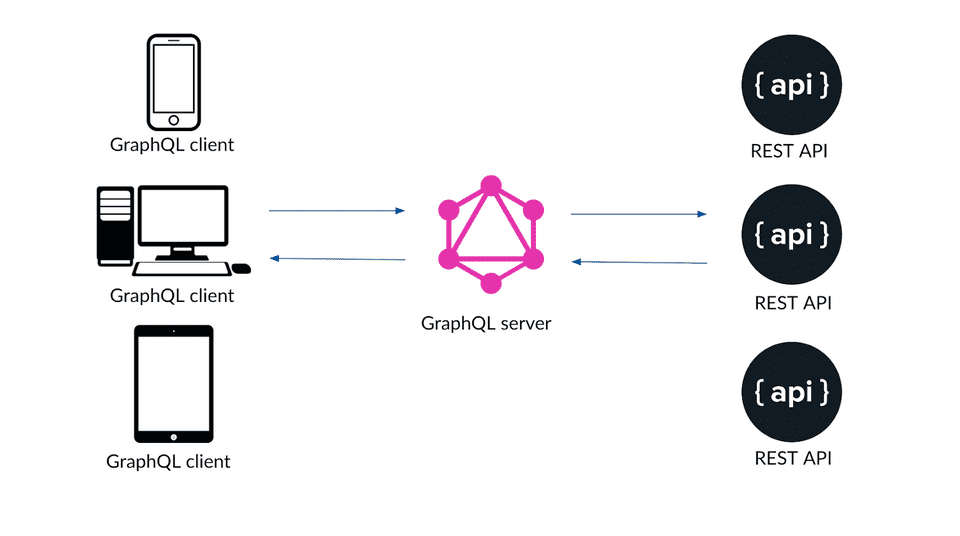
Unlike typical REST APIs, a GQL API is going to have just a single endpoint to query all of the data.
 GraphQL here
 ------------
  query {
      user {
          id,      ------> I'm able to query 2 different objects and not necessarily
                           pick every prop in the object either..
          name
          city
      }
      product {
          pid      ------>  In mobile, I could fetch just the bare minimum to make sure
          title             load time remains uncompromised.
                            In desktop, I could go all in, and grab other relevant
          price             data associated with this object such as comments, and or
          etc..             product ratings.
      }
  }

          _____
          |web|                 ____________                 ---
          |app|     <----->     |          |                /___\
          |___|                 |   API    |               /     \
                                |   to     |  <------>    /  DB   \
          –––––                 |   GQL    |             /__Mongo__\
          |mob|     <----->     |          |             |         |
          |ile|                ––––––––––––––            _VVVVVVVVV_
        _|____|_
Why GQL
- GraphQL is fast
- post with id,
- post details sent back
GET/posts/123
---------------------------->
                                       Post details
                  <---------------------------------------------------
Ex. A post rendering
- Posts by Author
GET/posts?author=3233
---------------------------->
                                       Posts by Author -server determines
                                       what data to is sent back
                  <---------------------------------------------------
A GraphQL Query
It lets the client describe exactly what data it needs from the
server and the server sends it back.
Instead of requesting one at a time, I can request the post details, other
posts by that author, any post comments, all within a single GQL request.
It lets the client determine what data gets back, instead of the server determinining what data it should sent back.
- GQL is flexible and
- GQL easy to maintain.
Fewer HTTP requests, flexible data querying and less code to manage.
GQL: Schemas and Queries
Types
Data to store such as a User type, Comment type, or a Post type, and needed
when we need to define/create an API.
Ex:
User type -------> id (string), name (string)
Post type -------> id (string), title (string), published (boolean)
Comment type ---->. id (string), text (string)
Relationships
A User can have many posts.
A Post belongs to a User.
A Post can have many comments.
A Comment associated with a Post.
A User can have many comments.
A Comment always belong to a User.
/* Query
   -----       */

   Querying objects, we need to specify fields we want

query {
	users {
    name
    email
    id
    posts {
      id
      title
      body
      published
    }


  }

}


/*
   Data
   -----
*/


{
  "data": {
    "users": [
      {
        "name": "Andrew",
        "email": "andrew@example.com",
        "id": "64566edb-06c0-4f3d-8f71-997d86d77342",
        "posts": [
          {
            "id": "995186c3-40d4-428d-835e-0b4ea53a97f7",
            "title": "GraphQL 101",
            "body": "This is how to use GraphQL...",
            "published": true
          },
          {
            "id": "1d982e9d-78f9-4518-89ee-efb107f1c55e",
            "title": "GraphQL 201",
            "body": "This is an advanced GraphQL post...",
            "published": false
          }
        ]
      },

    ]
  }
}
Things to remember with Apollo client
-
Always include an id as part of your query because it's used for caching. Apollo is going to use the path to the node based on the query as an index to store it, and that's a lot harder for Apollo to do when u do things like mutations since it's going to be a different path. So always setup the id.
-
Dont use await for your data:
await = useQuery(DOGS)
-
Apollo provides loading property already. Once the 'useQuery' promise is resolved and there's no errors, the data gets set; which causes the property to be updated with the data; which in turn causes a re-rendering of the entire component the data sits on..
-
Also important, especially if you're used to working with React, and are new to apollo client, that there's no need to create a
useStatefor the loading state. Most likely you would not need to use 'useCallback' or 'useEffect' either. -
Last Apollo client useQuery along with the data it returns, it also provides 2 other states:
loadinganderrorthat must be set or your application will break.Do something like this:
const { data, loading, error } = useQuery(DOGS);

if (loading) {
  return "is loading..."
}

if(error) console.log(error)

data.dogs.map(itm => itm.name)
... because without setting the loading and error states, there'll be no dogs data,
and the error will say something like ..blah of undefined'; which isn't very helpful.